
Earlier this year, the massive hype surrounding the Super Mario Galaxy movie release triggered a huge wave of nostalgia for one of the greatest Nintendo franchises ever made. For me, beyond the mind-bending gravity and galaxy hopping, there’s one specific feature that has always blown my mind: the Rolling Ball Galaxies.
In these levels, Mario hops on top of a giant sphere, and while the controls get wacky and chaotic, the real masterpiece lies in the music system. The audio reacts so fluidly to the ball's movement—shifting pitch, altering pace, and dynamically weaving layers in and out—that the immersion is absolute. You don't even realize it's happening until you really stop and pay close attention to it.
As a sound designer with some free time on my hands, I couldn't resist the challenge. I hopped into Unreal Engine to re-create this iconic interactive music system from scratch using MetaSounds and Blueprints. Here is a breakdown of how I did it!
1. Prototyping the Core Mechanics
To match the organic feel of the original game, the music system needed to follow three core rules driven by the ball's physics:
• Pitch/Speed Modulation: Accelerating shifts the pitch up (speeding up the track), while slowing down drops the pitch.
• Vertical Layering: Instrumental layers fade in and out based on specific speed thresholds.
• Playback Memory: If the player stops completely, the music pauses but stores its exact location so it can resume exactly where it left off, rather than restarting from the beginning.
2. The MetaSounds Architecture: Managing the Layers
The magic of interactive mixing happens entirely inside MetaSounds. For this project, I structured the soundtrack into three separate audio layers: a Base Layer (drums and bass), Layer 1 (bells and wobble), and Layer 2 (additional bells and synthesizer).
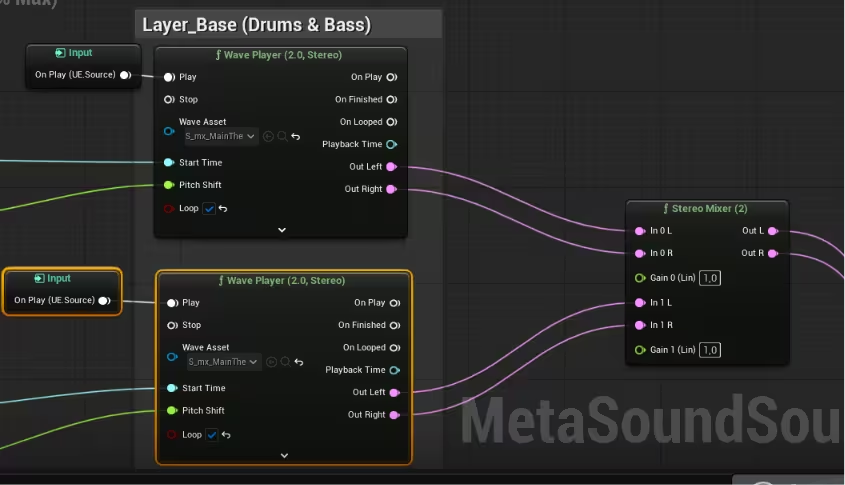
To prevent instruments from cutting in abruptly—which would completely break the illusion—I built custom interpolation logic hooked up to the gain control of each sub-mixer. When the game tells the MetaSound to "trigger Layer 1", the audio smoothly fades in while staying perfectly in sync. Each sub-mixer feeds into a master mixer, giving me granular control over the entire system's balance.
3. The Blueprint Logic: Bridging Physics and Audio
For this prototype, I attached the music component directly to the main character's ball Blueprint. While a larger project would definitely warrant a dedicated Music Manager system, having it directly inside the character actor makes it incredibly efficient to grab physical velocity variables on the fly.
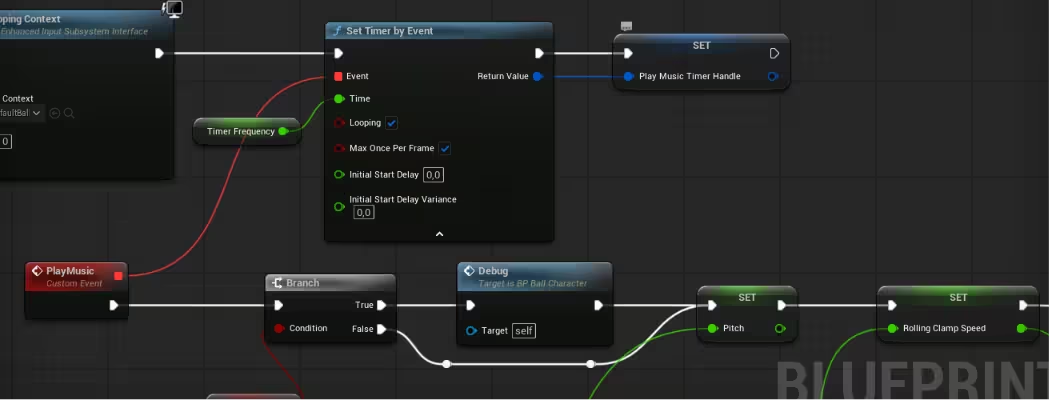
Instead of tanking performance by hooking this up to the heavy Event Tick node, I used a Set Timer by Event node on Begin Play. This calls a custom Play Music event at a regulated interval, which keeps things well-optimized. The Pitch input is clamped to a range between -2 and 2, and the speed is clamped between 0 and 1 before feeding those parameters straight into the MetaSound.
4. Solving the Playback Time Headache
One of the trickiest parts of this process, was is dealing with pauses. I needed a way to store the current position in time of the music when the music stopped, so we could restart from there when it started again. If the music restarted from second zero every single time the ball stopped, it would drive players crazy within minutes. To solve this, I designed a mathematical function that calculates the passage of time using World Delta Seconds added to a custom timestamp variable, wrapped neatly with a modulo operator.
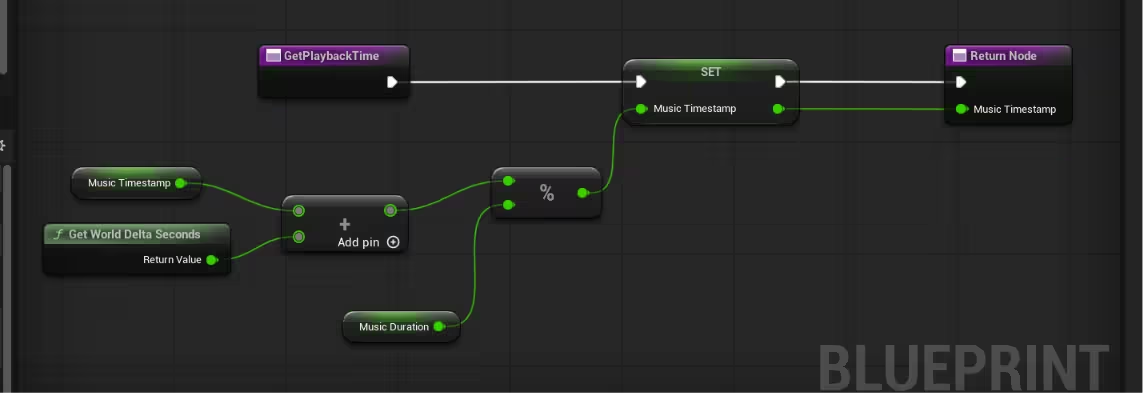
This ensures that whenever the timer exceeds the track duration, it cleanly wraps back around to zero and feeds back into itself. When the ball stops moving, the system safely stores that final timestamp, allowing the music to resume flawlessly on the next push.
This ensures that whenever the timer exceeds the track duration, it cleanly wraps back around to zero and feeds back into itself. When the ball stops moving, the system safely stores that final timestamp, allowing the music to resume flawlessly on the next push.
Re-creating classic industry mechanics is one of the best ways to master the true potential of tools like MetaSounds. This prototype proves that with a handful of interpolation nodes, an optimized timer handle, and a tiny bit of looping math, you can craft incredibly immersive dynamic audio experiences.
Don't wanna read? I got you! Here's the video version of this blog!!